Σελίδες

Πέμπτη 30 Απριλίου 2015

Did You Know That Google Is Tracking Your Movement? AnonHQ

Did You Know That Google Is Tracking Your Movement? AnonHQ:


6 links that will show you what Google knows about you — Productivity in the Cloud — Medium

6 links that will show you what Google knows about you


(Photo by Alex Koloskov at www.photigy.com )
Want to find out all the things Google knows about you? Here are 6 links that will show you some of the data Google has about you.

1. Find out what Google thinks about you

In order to serve relevant ads, Google collects data about you and creates a profile. You can control and review the information Google has on you here:
Google also has a tool called Google Analytics, that helps publishers see what pages you have viewed on their website, how many times you have visited it, how long did you stay etc. You can opt out if you don’t want this type of data to be collected:

2. Find out your location history

If you use Android, your mobile device may be sending your location to Google. You can see your entire location history here:

3. Find out your entire Google Search history

Google saves every single search you have ever done. On top of that, they record every Google ad you have clicked on. This log is available in Google web history controls:

4. Get a monthly security and privacy report from Google

Google offers an Account activity page that tells you about all the Google services you are using. You can even enable a monthly report that will be sent to your email:

5. Find out all the apps and extensions that are accessing your Google data

The Account activity page also offers a list of all the apps that have any type of access to your data. You can see the exact type of permissions granted to the app and revoke access to your data here:

6. Export all of your data out of Google

Google lets you export all your data: bookmarks, emails, contacts, drive files, profile info, your youtube videos, photos and more here:

BONUS

Google also keeps a history of your YouTube searches. You can find it here:

Brought to you by the team behind Cloud Fender. Originally published atblog.cloudfender.com.

6 links that will show you what Google knows about you — Productivity in the Cloud — Medium:


Google Maps Has Been Tracking Your Every Move, And There’s A Website To Prove It | Natural Cures Not Medicine

Google Maps Has Been Tracking Your Every Move, And There’s A Website To Prove It

google-maps-controls-you

by RevContent
Remember that scene in Minority Report, where Tom Cruise is on the run from the law, but is unable to avoid detection because everywhere he goes there are constant retina scans feeding his location back to a central database? That’s tomorrow. Today, Google is tracking wherever your smartphone goes, and putting a neat red dot on a map to mark the occasion.
You can find that map here. All you need to do is log in with the same account you use on your phone, and the record of everywhere you’ve been for the last day to month will erupt across your screen like chicken pox.
We all know that no matter what ‘privacy’ settings you may try and implement, our information is all being collected and stored somewhere. That knowledge sits in the back of our minds, and is easy to drown out by shoving in some headphones and watching Adventure Time on repeat until everything stops being 1984. But it’s a sharp jolt back to reality when you see a two dimensional image marking your daily commute with occasional detours to the cinema or a friend’s house.
tracking-map
Looking at mine, I realised that a) I live my life in a very small radius, and b) there are places on my map that I don’t remember going. One of them I’ve apparently visited three times on different days. Once whilst “Biking” and twice while “Stationary”. All at times I wouldn’t usually be awake. I’m not sure what’s happening on Wood Street in North Melbourne, or why my phone apparently travels there without me, but I’m not going to rule out secret alien conspiracies.
google-conspiracy
This never happened. UNLESS IT DID.
Apparently this record only happens if you have ‘location services’ switched on in your phone; if you do and you’re finding you have no data, then it means that either you don’t exist or you’ve beaten the system. If it’s the latter, please teach me your ways; I know for a fact that I switched my phone’s location detection off, but apparently it somehow got switched back on.
Oh well. Perhaps this month I’ll take some inspiration from the runner who used Nike+ to draw this – except this time when the dots are joined, they’ll just form a huge, unblinking eye. With occasional side trips to Wood Street.
Get creeped out by logging in here.
via junkee
But! Before you worry too much, we can tell you this: There is a way to disable it now and even erase your past history map. So all is not lost. We are all about solutions here at natural cures, we weren’t about to let you walk away upset without a solution! Nope. That’s why we found you this:
TO SEE IF YOU HAVE LOCATION HISTORY ENABLED, HEAD TO THE GOOGLE MAPS LOCATION HISTORY PAGE. CLICK THE GEAR-ICON BUTTON TO ACCESS HISTORY SETTINGS. HERE, YOU CAN CHOOSE TO DISABLE OR ENABLE THE SERVICE.
DISABLING LOCATION HISTORY, HOWEVER, DOES NOT REMOVE YOUR PAST HISTORY. IF YOU’D LIKE TO ERASE THE LOCATIONS GOOGLE HAS STORED FOR THE PAST 30 DAYS, HEAD BACK TO THE LOCATION HISTORY PAGE. THE DEFAULT TIME PERIOD SHOWS LOCATION HISTORY FOR THE CURRENT DAY, SO YOU MAY NOT SEE ANY PLOTS ON THE MAP.
USE THE PULL-DOWN MENU BELOW THE CALENDAR ON THE LEFT TO SHOW YOUR HISTORY, UP TO 30 DAYS. IF YOU CHOOSE A TIME PERIOD IN WHICH GOOGLE HAS TRACKED YOUR LOCATION, YOU’LL SEE THE POINTS WHERE YOU’VE BEEN ON THE MAP. AND BELOW THE CALENDAR, YOU’LL SEE OPTIONS TO DELETE YOUR HISTORY FROM THE TIME PERIOD YOU HAVE CHOSEN OR TO DELETE ALL HISTORY.Google Maps Has Been Tracking Your Every Move, And There’s A Website To Prove It | Natural Cures Not Medicine:


Google Maps Has Been Tracking Your Every Move, And There’s A Website To Prove It | Natural Cures Not Medicine

Google Maps Has Been Tracking Your Every Move, And There’s A Website To Prove It

google-maps-controls-you

by RevContent
Remember that scene in Minority Report, where Tom Cruise is on the run from the law, but is unable to avoid detection because everywhere he goes there are constant retina scans feeding his location back to a central database? That’s tomorrow. Today, Google is tracking wherever your smartphone goes, and putting a neat red dot on a map to mark the occasion.
You can find that map here. All you need to do is log in with the same account you use on your phone, and the record of everywhere you’ve been for the last day to month will erupt across your screen like chicken pox.
We all know that no matter what ‘privacy’ settings you may try and implement, our information is all being collected and stored somewhere. That knowledge sits in the back of our minds, and is easy to drown out by shoving in some headphones and watching Adventure Time on repeat until everything stops being 1984. But it’s a sharp jolt back to reality when you see a two dimensional image marking your daily commute with occasional detours to the cinema or a friend’s house.
tracking-map
Looking at mine, I realised that a) I live my life in a very small radius, and b) there are places on my map that I don’t remember going. One of them I’ve apparently visited three times on different days. Once whilst “Biking” and twice while “Stationary”. All at times I wouldn’t usually be awake. I’m not sure what’s happening on Wood Street in North Melbourne, or why my phone apparently travels there without me, but I’m not going to rule out secret alien conspiracies.
google-conspiracy
This never happened. UNLESS IT DID.
Apparently this record only happens if you have ‘location services’ switched on in your phone; if you do and you’re finding you have no data, then it means that either you don’t exist or you’ve beaten the system. If it’s the latter, please teach me your ways; I know for a fact that I switched my phone’s location detection off, but apparently it somehow got switched back on.
Oh well. Perhaps this month I’ll take some inspiration from the runner who used Nike+ to draw this – except this time when the dots are joined, they’ll just form a huge, unblinking eye. With occasional side trips to Wood Street.
Get creeped out by logging in here.
via junkee
But! Before you worry too much, we can tell you this: There is a way to disable it now and even erase your past history map. So all is not lost. We are all about solutions here at natural cures, we weren’t about to let you walk away upset without a solution! Nope. That’s why we found you this:
TO SEE IF YOU HAVE LOCATION HISTORY ENABLED, HEAD TO THE GOOGLE MAPS LOCATION HISTORY PAGE. CLICK THE GEAR-ICON BUTTON TO ACCESS HISTORY SETTINGS. HERE, YOU CAN CHOOSE TO DISABLE OR ENABLE THE SERVICE.
DISABLING LOCATION HISTORY, HOWEVER, DOES NOT REMOVE YOUR PAST HISTORY. IF YOU’D LIKE TO ERASE THE LOCATIONS GOOGLE HAS STORED FOR THE PAST 30 DAYS, HEAD BACK TO THE LOCATION HISTORY PAGE. THE DEFAULT TIME PERIOD SHOWS LOCATION HISTORY FOR THE CURRENT DAY, SO YOU MAY NOT SEE ANY PLOTS ON THE MAP.
USE THE PULL-DOWN MENU BELOW THE CALENDAR ON THE LEFT TO SHOW YOUR HISTORY, UP TO 30 DAYS. IF YOU CHOOSE A TIME PERIOD IN WHICH GOOGLE HAS TRACKED YOUR LOCATION, YOU’LL SEE THE POINTS WHERE YOU’VE BEEN ON THE MAP. AND BELOW THE CALENDAR, YOU’LL SEE OPTIONS TO DELETE YOUR HISTORY FROM THE TIME PERIOD YOU HAVE CHOSEN OR TO DELETE ALL HISTORY.Google Maps Has Been Tracking Your Every Move, And There’s A Website To Prove It | Natural Cures Not Medicine:


Παρασκευή 24 Απριλίου 2015

Here’s How to Download and Delete What Google Search Knows About You

Here’s How to Download and Delete What Google Search Knows About You:


Here’s How to Download and Delete What Google Search Knows About You


Have you ever wondered what Google Search really knows about you? Well, now you can check, as Google has added a new feature that lets you view and download your entire search history.
Yep. Everything.
The feature, which was spotted by the unofficial Google Operating System Blog — though VentureBeat points out that the function was made available in January — gives you access to everything from what you searched for to the links you clicked on from those searches. It also shows you the addresses you’ve searched for.
I was even able to see the list of images I clicked on while searching for pictures of cats eating spaghetti. Now imagine what you’ve looked for. Oh, and clearing your browser history won’t delete this data.
But there’s no reason to panic, because in addition to being able to download your search history, you can clear it.

First, here’s how to download your history:

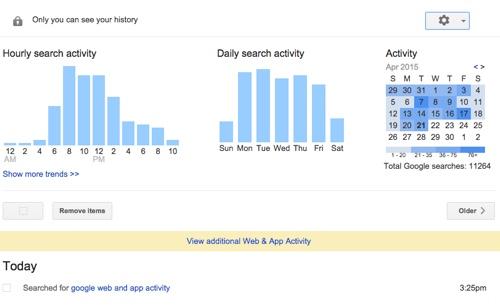
1. Navigate to Google’s Web and App Activity page.


image


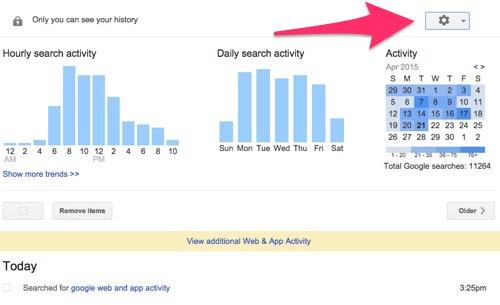
2. Next, click the gear icon in the top-right corner of the screen.


image


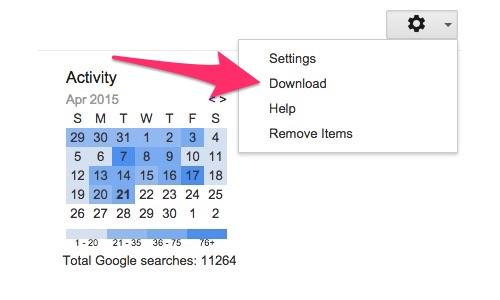
3. Then select Download from the drop-down menu.


image


You’ll then receive a pop-up window warning you not to download your search history to a public computer, as it contains a large amount of sensitive information.
4. If you want to continue, click Create Archive


image


Once your history is downloaded, you’ll receive a link in a few seconds that lets you view your data.
If you don’t want to download your data, and would rather get rid of it, you can do that as well. Of course, there are some reasons to let Google keep your search data. For one thing, it guarantees faster search results. It also ensures that Google Now has all of the latest relevant information about you. If you delete your data, your searches won’t be as tailored to your habits.

Still want to get rid of your search history? Here’s how:

Before we get started, it’s worth pointing out that if you want to keep your information hidden, you can use your browser’s privacy option, which keeps Google from saving your data — though it can still be seen by your service provider or employer.
Simply deleting you browser history won’t clear the data saved by Google, as you’re only deleting the information stored by your browser and not what’s on Google’s servers. To do that, you’ll have to:
1. Navigate to the Web and App Activity Page and click the gear iconin the top-right corner.


image


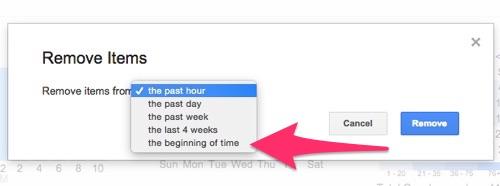
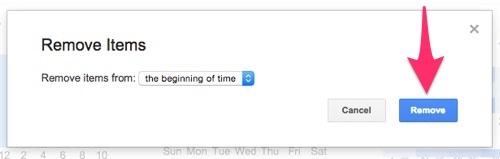
2. Select Remove Items and choose the beginning of time from the drop-down menu.


image


3.Click Remove and kiss your data goodbye.


image


That’s it. All of your search history will be deleted, and you’ll never have to worry about Google knowing about the time you looked for tickets to a Justin Bieber concert.